
AbbVie AI-Powered QA Testing Dashboard
Streamlining conversational AI validation through automation, expected-output comparisons, prompt library management, and real-time failure diagnostics.
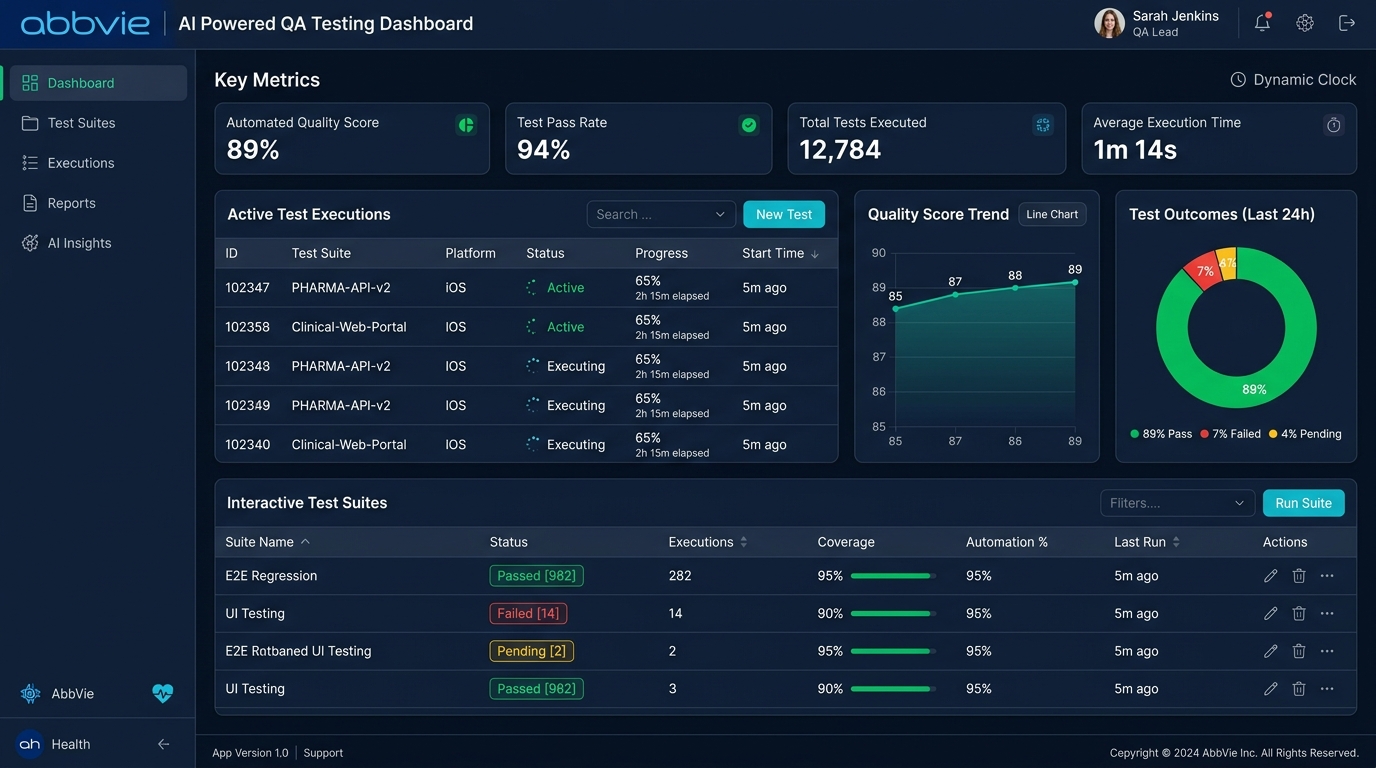
Overview & Context
As pharmaceutical organizations increasingly adopt Generative AI-powered chatbots to support employees, researchers, medical representatives, and customer service teams, ensuring the quality, safety, and consistency of AI-generated responses becomes a critical business requirement.
AbbVie sought to streamline its chatbot validation process by building an AI-assisted Quality Assurance platform capable of testing conversational agents across multiple scenarios. Traditional manual testing methods were time-consuming, inconsistent, and difficult to scale as new prompts, models, and features were continuously introduced.
"The objective of this project was to design an intuitive dashboard that enabled QA teams to create, execute, monitor, and analyze chatbot test cases from a single interface while leveraging Generative AI to automate repetitive validation tasks."
As the Product Designer, I collaborated closely with product managers, AI engineers, and developers to transform complex testing workflows into an efficient, user-centric experience that reduced manual effort and improved testing visibility.
Problem Statement
Existing chatbot testing workflows relied heavily on manual execution and spreadsheet-based documentation, creating several operational challenges:
Slow Regression runs
Test cases had to be executed individually, making regression testing slow and resource-intensive.
Limited Visibility
There was limited visibility into test execution status, failed prompts, and chatbot response quality.
Version Comparisons
Comparing outputs across multiple AI model versions required significant manual effort.
Prompt Consistency
QA teams struggled to maintain consistency while validating large prompt libraries.
Furthermore, collaboration between AI developers and QA engineers lacked a centralized workflow, and decision-makers had limited insights into chatbot quality trends and release readiness. These inefficiencies delayed product releases and increased the effort required to maintain high-quality conversational AI experiences.
Goals & Success Criteria
The primary goals of the project were to:
Centralize QA Workflows
Consolidate fragmented chatbot evaluation processes into a single unified workspace platform.
Automate Testing
Automate repetitive testing activities and batch evaluations using Generative AI validation.
Improve Visibility
Track chatbot performance trends across multiple test scenarios with real-time analytics.
Reduce Manual Time
Reduce manual verification hours while simultaneously increasing testing precision and accuracy.
"Success would be measured through improved testing efficiency, reduced execution time, increased visibility into AI quality metrics, and faster release cycles."
My Role as Product Designer
As the Product Designer, I was responsible for translating a technically complex QA workflow into an intuitive product experience. My responsibilities included:
Discovery
Understanding existing workflows and mapping end-to-end testing journeys.
Info Architecture
Organizing test cases, prompts, and reports in a scalable structure.
UI & Prototyping
Designing wireframes, high-fidelity Figma screens, and clickable prototypes.
Team Handoff
Designing reusable UI components aligned with brand systems and collaborating with developers during Design QA implementation.
AI Chatbot Test Case Simulator
Configure test counts and validation thresholds to run automated evaluations on AbbVie chatbots.
Select a preset run or adjust parameters in the sidebar and click execute to compile QA evaluations reports.
Design System & Specifications
To maintain consistency and accelerate implementation, reusable UI components were created using the organization's existing design framework. The system included:
Dashboard cards & Tables
Status Indicators & Charts
Filters & Search Patterns
Navigation & Modals
Form Controls
Notifications
These reusable components reduced design redundancy while ensuring a scalable and maintainable interface.
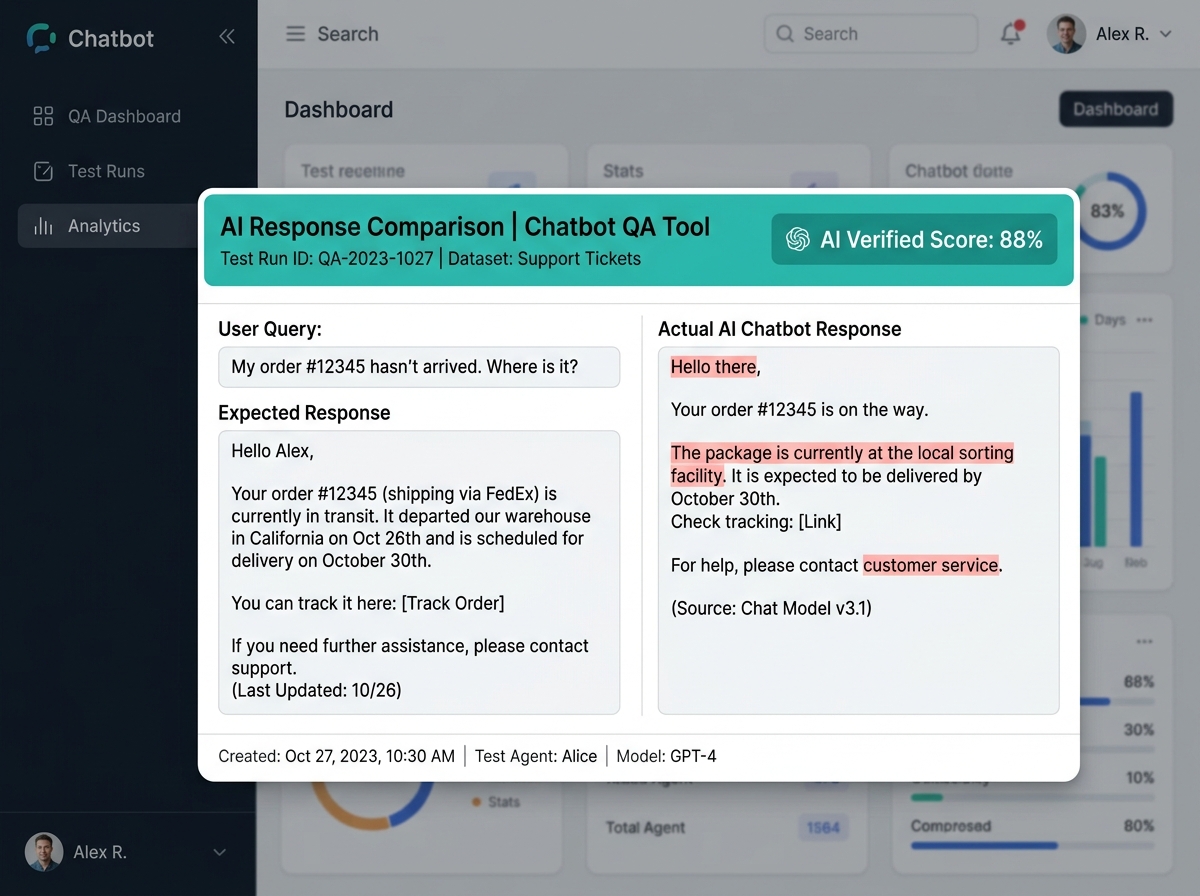
AI Response Validation Close-Up
Research & Discovery Phase
The discovery phase focused on understanding how QA engineers currently validated conversational AI systems and identifying opportunities for automation. Activities included:
Workshops & Alignment
- • Requirement gathering workshops with Product Managers.
- • Discussions with AI engineers regarding model evaluation workflows.
- • Benchmarking modern AI testing platforms to identify UX best practices.
Spreadsheet Audits
- • Auditing existing spreadsheet-based testing methods.
- • Identification of repetitive manual verification tasks.
- • Mapping relationships between prompts, expected outputs, and model versions.
The research highlighted the importance of simplifying complex testing operations without exposing unnecessary technical complexity to end users.
Design Process
The design process followed an iterative product design methodology across 8 core phases:
1. Discovery
Understanding QA workflows and challenges.
2. Definition
Identifying usability gaps & opportunities.
3. IA Structure
Organizing prompt libraries and test suites.
4. Wireframes
Exploring layout hierarchy and dashboard placement.
5. Hi-Fi UI
Creating polished components and charts.
6. Prototype
Simulating complete workflow interactions.
7. Handoff
Providing component spec documentation.
8. Design QA
Reviewing screens to ensure implementation match.
QA Engineer Journey Flow
The chronological step-by-step path configured for QA engineers validating models:
- 01 Login & Authentication
- 02 Select AI Chatbot target profile
- 03 Choose specific validation Test Suite
- 04 Configure test metrics parameters & thresholds
- 05 Execute Run AI Evaluation batch
- 06 Monitor Execution Progress dashboard live
- 07 Review Generated Responses logs
- 08 Compare Expected versus Actual Output side-by-side
- 09 Analyze Failure details and root causes
- 10 Generate downloadable QA Evaluation Report
- 11 Share results report with AI development team
Key Design Decisions
Dashboard-First Experience
A dashboard-centric approach provided immediate visibility into testing progress, execution status, and overall chatbot health.
AI-Assisted Validation
Instead of manually comparing every chatbot response, the interface highlighted AI-generated evaluation summaries, allowing users to focus on meaningful discrepancies.
Progressive Disclosure
Advanced testing configurations were hidden behind expandable sections, reducing cognitive load for first-time users while maintaining flexibility for advanced QA engineers.
Visual Test Indicators & Analytics
Color-coded execution states (failed, pending, successful) and interactive charts helped stakeholders quickly identify trends in chatbot quality over time.
Key Features Delivered
AI Test Case Management
Create, edit, organize, and execute reusable chatbot test scenarios.
Prompt Library
Maintain centralized collections of prompts categorized by use case and business function.
Batch Test Execution
Execute multiple chatbot test cases simultaneously to reduce regression testing time.
AI Response Comparison
Compare expected outputs with AI-generated responses to identify inconsistencies.
Automated Quality Scoring
Generate AI-assisted quality scores based on predefined evaluation criteria.
Failure Analysis & Reports
Identify failed conversations, root causes, and export reports for stakeholders.
Interactive Prototype Walkthroughs
The interactive prototype simulated complete QA workflows, enabling stakeholders to experience the platform before development began. Interactions included:
- • **Creating test suites** and configuring parameters.
- • **Executing chatbot validation runs** and monitoring real-time progress.
- • **Reviewing AI-generated responses** and comparing expected outputs.
- • **Exploring analytics dashboards** and exporting reports.
"The prototype played a critical role in validating navigation patterns and minimizing usability issues prior to implementation."
Technical Challenges Encountered
User Complexity
Simplifying highly technical AI evaluation workflows for non-technical users.
High Data Volume
Displaying large volumes of testing data without overwhelming dashboard users.
Model Scalability
Designing scalable interfaces capable of supporting future LLM AI models.
Balancing Automation
Balancing rapid automated testing metrics with necessary manual validation review requirements.
The Final Solution
The final solution transformed fragmented QA processes into a unified AI-powered testing platform that streamlined chatbot validation through automation, centralized reporting, and actionable analytics. By emphasizing task efficiency, reusable workflows, and intuitive navigation, the platform significantly reduced manual effort while improving visibility across the entire QA lifecycle.
Business Impact Mapped
Modernising Chatbot QA
- • **Accuracy Consistency:** Significantly improved consistency across chatbot evaluations.
- • **Speed to Release:** Accelerated regression testing cycles for rapid AI deployments.
- • **Enhanced Collaboration:** Bridges the reporting gap between QA engineers and development teams.
- • **Confident Decisions:** Supported confident product release decisions with data-driven insights.
Team Collaboration
This project required close collaboration across multiple disciplines. I worked alongside:
Final Deliverables Package
- UX Research Findings reports
- User Journey Maps & Flows
- Information Architecture mapping
- Low-Fidelity Wireframes
- High-Fidelity UI Designs in Figma
- Interactive click-through Prototype
- Design System UI component library
- Handoff Specs & Design QA documentation
Key Learnings
Trust & Transparency in AI
Designing for AI-powered quality assurance reinforced the importance of balancing automation with human oversight. While Generative AI significantly reduced repetitive testing tasks, the user experience needed to maintain transparency, trust, and control throughout the validation process. This project strengthened my ability to simplify technically complex workflows, collaborate with cross-functional teams, and design enterprise-grade AI products that scale with evolving business needs.
Impact Summary
Unified Testing Platform Success
By redesigning AbbVie's chatbot quality assurance workflow into a centralized AI-powered platform, we transformed a fragmented, manual testing process into an intelligent, scalable solution. The resulting experience improved operational efficiency, streamlined collaboration between QA and AI teams, enhanced visibility into chatbot performance, and established a strong design foundation for future Generative AI initiatives within the organization.